August 7th, 2026
Documents
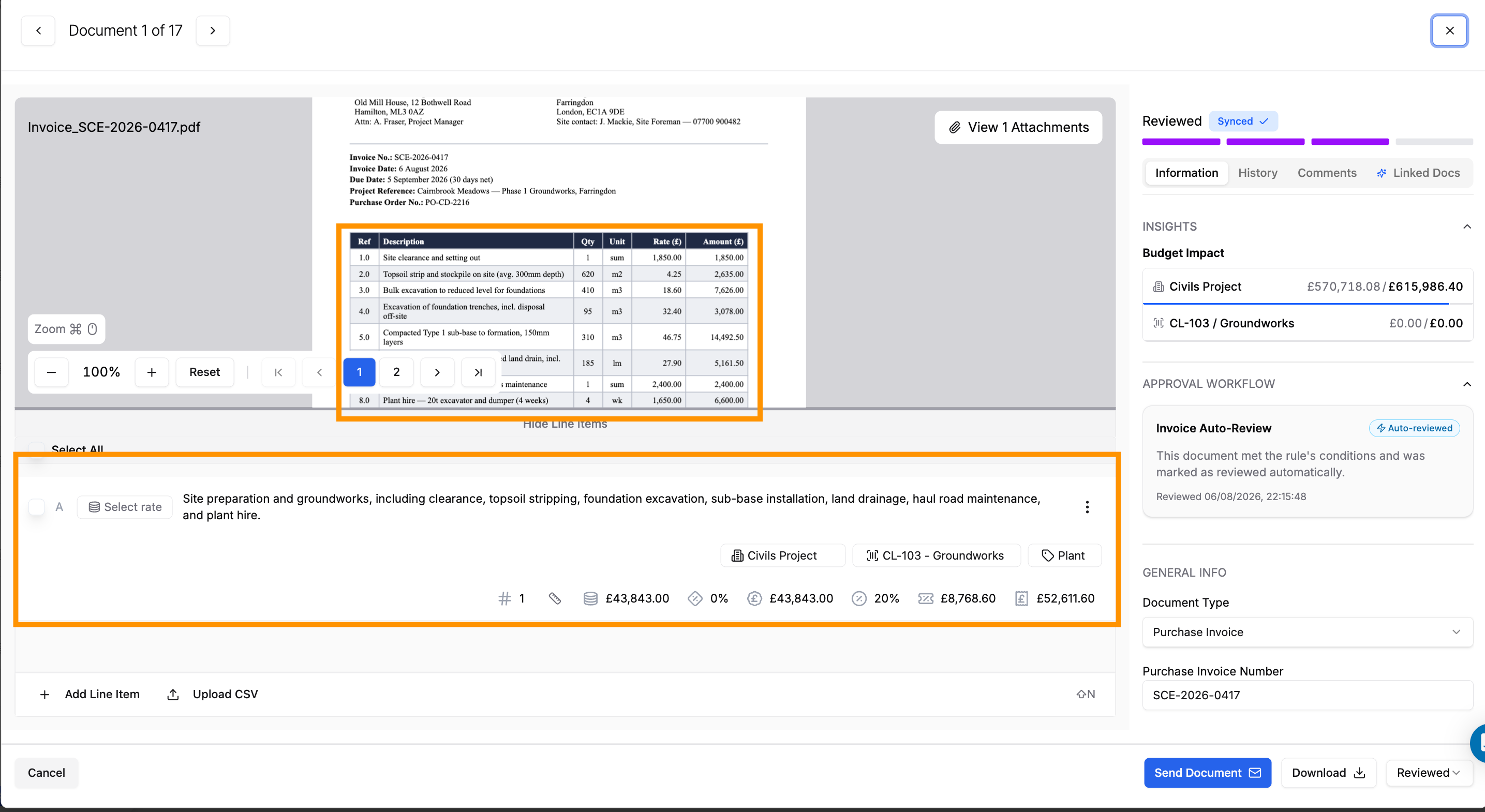
Summarise documents to one line item – You can now choose to summarise all documents processed by Coreloops into one line item. You can choose to set this up for all or some suppliers. This replaces the custom prompt, so behaviour like grouping line items by VAT rate on multi-rate receipts is consistent every time.
Assign a document to more than one person – documents can now be assigned to more than one person at once, useful when input is needed from two people, such as a project manager and a commercial lead, rather than passing it back and forth.
Retry documents that failed AI processing – if a document fails during AI processing, you can now retry it directly rather than re-uploading it from scratch.
Alerts when an emailed document fails to process – if a document sent in by email fails to process, you're now alerted, so it doesn't sit silently in the inbox.
Notified when a WhatsApp upload fails – if a document sent via WhatsApp fails to upload, the sender is now notified directly, so they know to try again.
BOQs
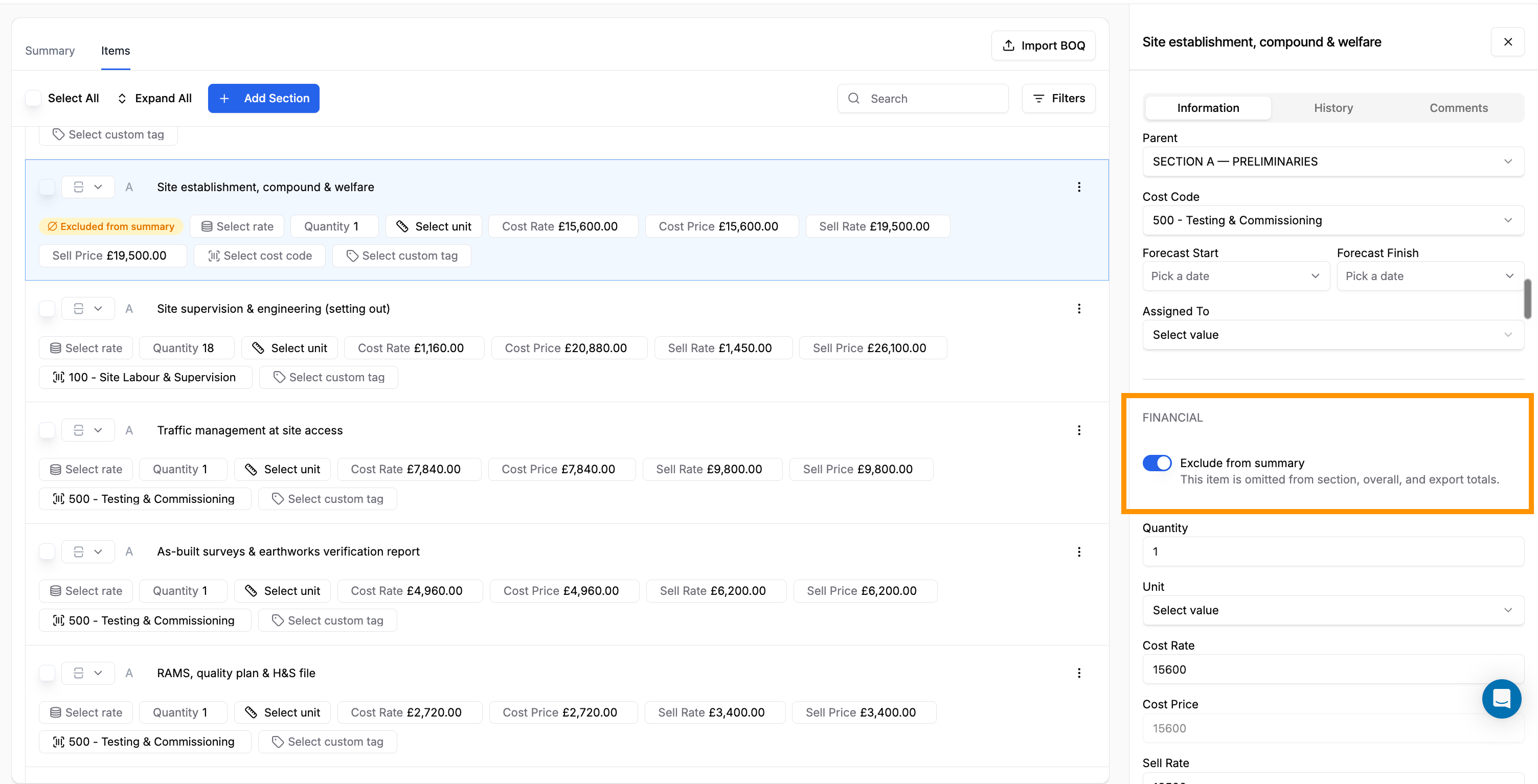
Exclude line items from your summary and payment applications – exclude specific BOQ line items from your contract summary. This is handy for Prov Sums that have not yet been agreed or variations you’d like to show in payment applications but exclude from the contract value.
Reorder line items – drag and drop to reorder line items within a BOQ, instead of being stuck with the order they were entered or imported in.
Colour-coded line item types – line item types are now colour-coded, making it easier to scan a BOQ and tell items apart at a glance.
Apply rates directly within the BOQ table – apply rates from your rate library directly within the BOQ table, rather than looking them up and entering them by hand.
Import rate library items via CSV – import items into your rate library via CSV instead of adding them one by one.
Upload a CSV to add line items – upload a CSV to add line items and sub-section to a BOQ section in one go, instead of entering them individually.
Payment Applications
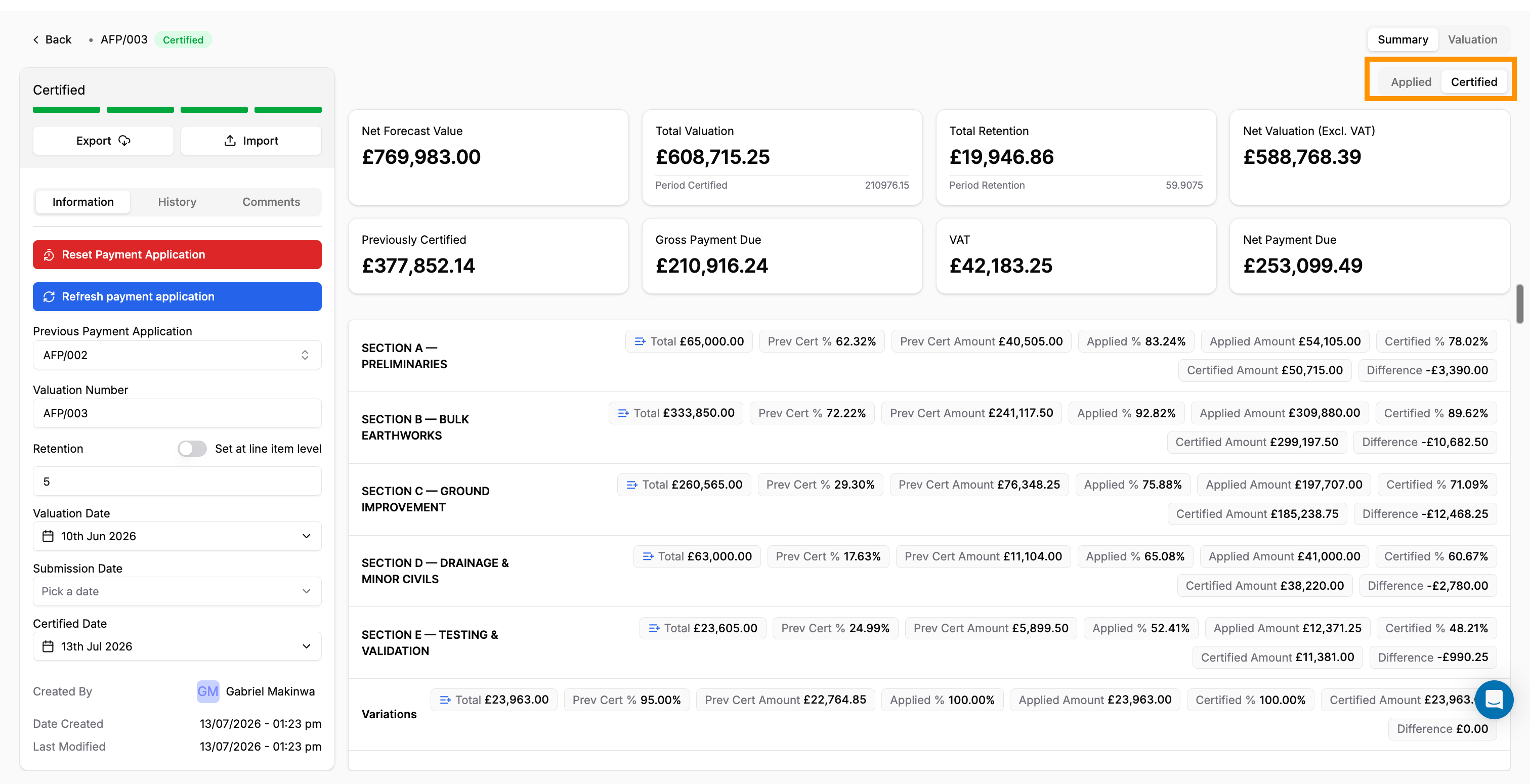
Toggle between applied and certified values – the summary now lets you toggle between applied and certified values, so you can compare what's been claimed against what's been signed off without switching screens.
Choose which columns show in the table – choose which metric columns show in the Payment Applications table, so you only see the figures that matter.
More detail on the table – the table now shows published status, valuation date, certified date, and last published and last modified dates, so you can see where each application stands without opening it.
Cost Reports & CorePilot
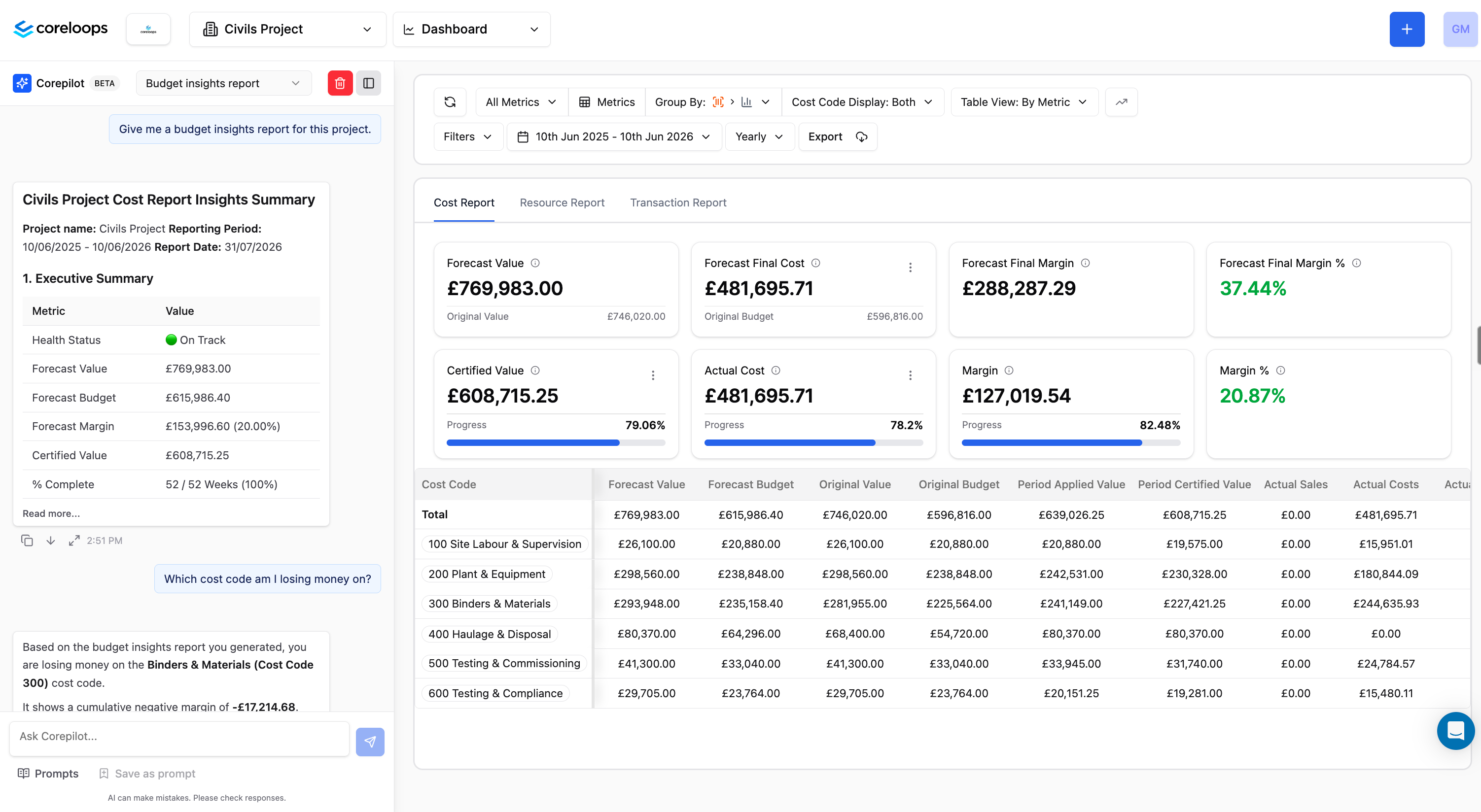
CorePilot chat now in the Cost Report – CorePilot chat, already available on Documents, is now available within the Cost Report too, so you can ask questions about the report you're viewing without leaving the page. It opens with a greeting and a few suggested questions, such as generating an insights summary or a month-on-month breakdown.
View by month or by metric – the Cost Report table can now be viewed by month or by metric, so you can switch between a timeline view and a metric-by-metric breakdown.
Tooltips on metrics – Cost Report metrics now have contextual tooltips explaining what each figure means.
Reports open inline in CorePilot chat – reports generated by CorePilot now open inline within the chat itself, instead of taking over the screen in a separate panel.
Split by a custom "Summary" timeframe – reports can now be split using a "Summary" option across custom timeframes, giving more flexibility over how a period is broken down.
Timesheets
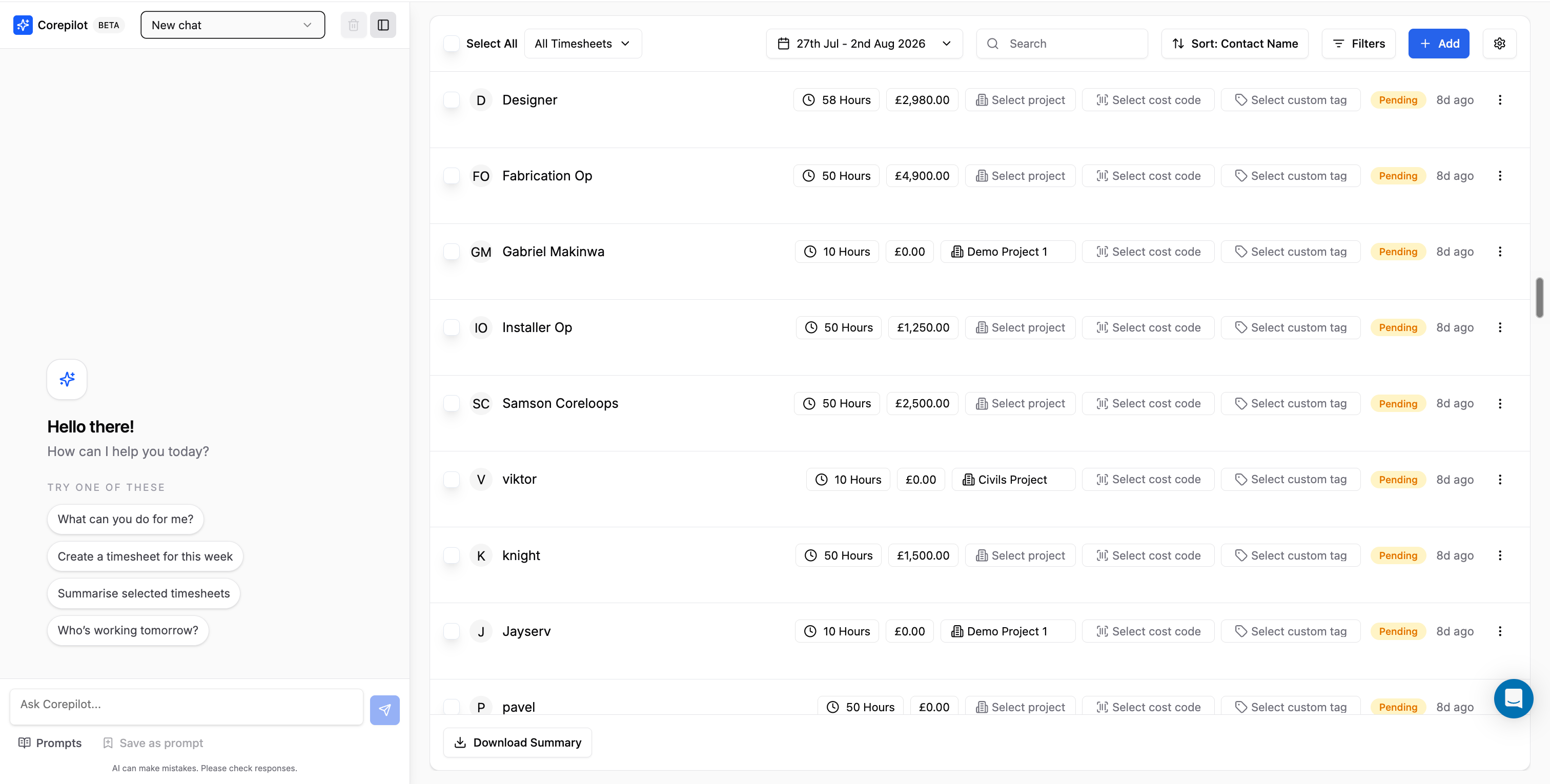
CorePilot in Timesheets – ask CorePilot who's working tomorrow or this week directly from Timesheets, and get a quick plain-English summary instead of scanning the grid.
Prompt to update rates after a rate change – if a contact's rate changes, you're now prompted to update their existing timesheets to match, so outdated rates don't get left behind.
Configurable payment terms on contacts – contacts now have a configurable payment terms field (weekly, biweekly or monthly), filterable on the Timesheets page and in the Download Timesheet Summary.
Customise your Download Summary – the Timesheet Download Summary now lets you customise which columns and rate breakdowns are included, so you can tailor it to what payroll or accounts actually need.
Configurable rounding for clocked hours – configure the rounding interval used for clocked hours, so recorded time rounds the way your business actually pays it.
Warning for incomplete clocking information – you're now warned when clocking information is incomplete, so a missing clock-in or clock-out gets flagged before it causes a problem.
Tax & Approvals
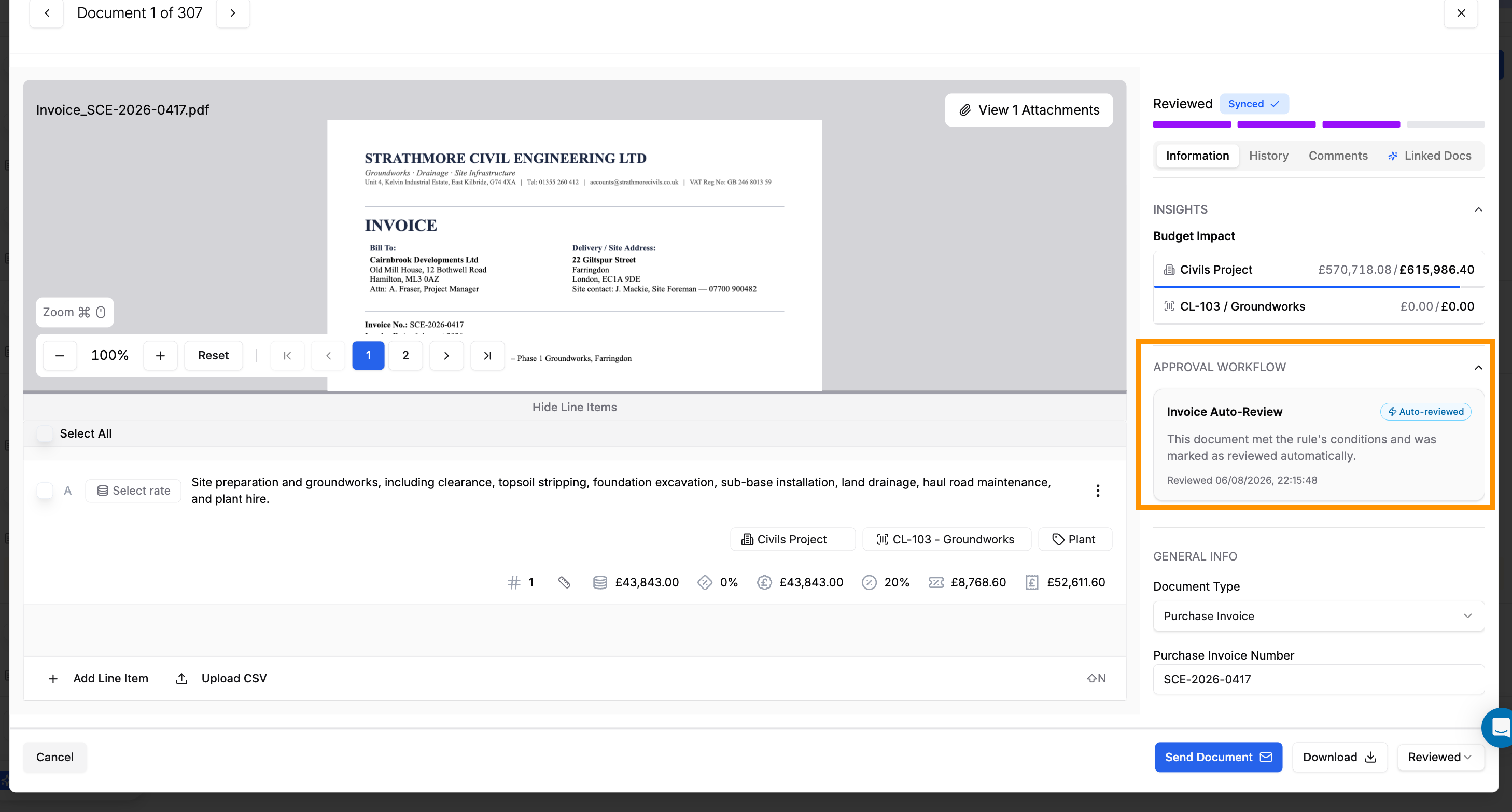
Auto-approve invoices that meet a rule – approval policies can now automatically mark an invoice as reviewed or approved when it meets a rule you set, such as an AI confidence score above a threshold, instead of only routing it to a person for sign-off.
Create your own country-scoped tax rates – create custom tax rates, each scoped to a specific country, and Coreloops will automatically register and apply the right one to matching documents.
More accurate CIS deductions – enter materials and labour amounts separately in the CIS section, and the CIS deduction is calculated from the labour portion automatically (still fully overridable), for more accurate deductions at 0%, 20% and 30% rates.
QuickBooks & Accounting Sync
Clearer sync error messages – when a document fails to sync to QuickBooks, you now see a clear explanation of what went wrong, such as an expired QuickBooks connection, instead of a raw API error.
Track spend by Department or Location – track spend by Department or Location as a second tracking dimension alongside your existing categories.
Voiding or deleting a document now syncs – voiding or deleting a document now also voids or deletes the matching record in QuickBooks, keeping the two systems in sync.
Marking a document as paid now syncs – marking a document as paid now creates the matching payment record in QuickBooks automatically, saving you from recording it twice.
Bugs fixed
Fixed BOQ line items not appearing immediately after being added, without needing a refresh
Fixed CorePilot Insights occasionally generating reports from the wrong view
Receipts with multiple VAT rates now split into one line item per rate instead of merging them
Fixed the BOQ collapsing unexpectedly when a new section or subsection was added
Fixed a sync error affecting documents that aren't set to sync
Fixed an incorrect period definition affecting CorePilot cost report answers
Fixed resending an invite link not clearing its expired state
Fixed bulk contact import failures
July 9th, 2026

This month's update brings a ton of helpful updates. Coreloops now automatically catches and corrects rounding mismatches, reads payment certificates for you, and suggests column mappings when you import payment applications. We've also added support for working across multiple currencies, plus fixes across timesheets, cost reports and Xero sync.
Configure your own overtime rules
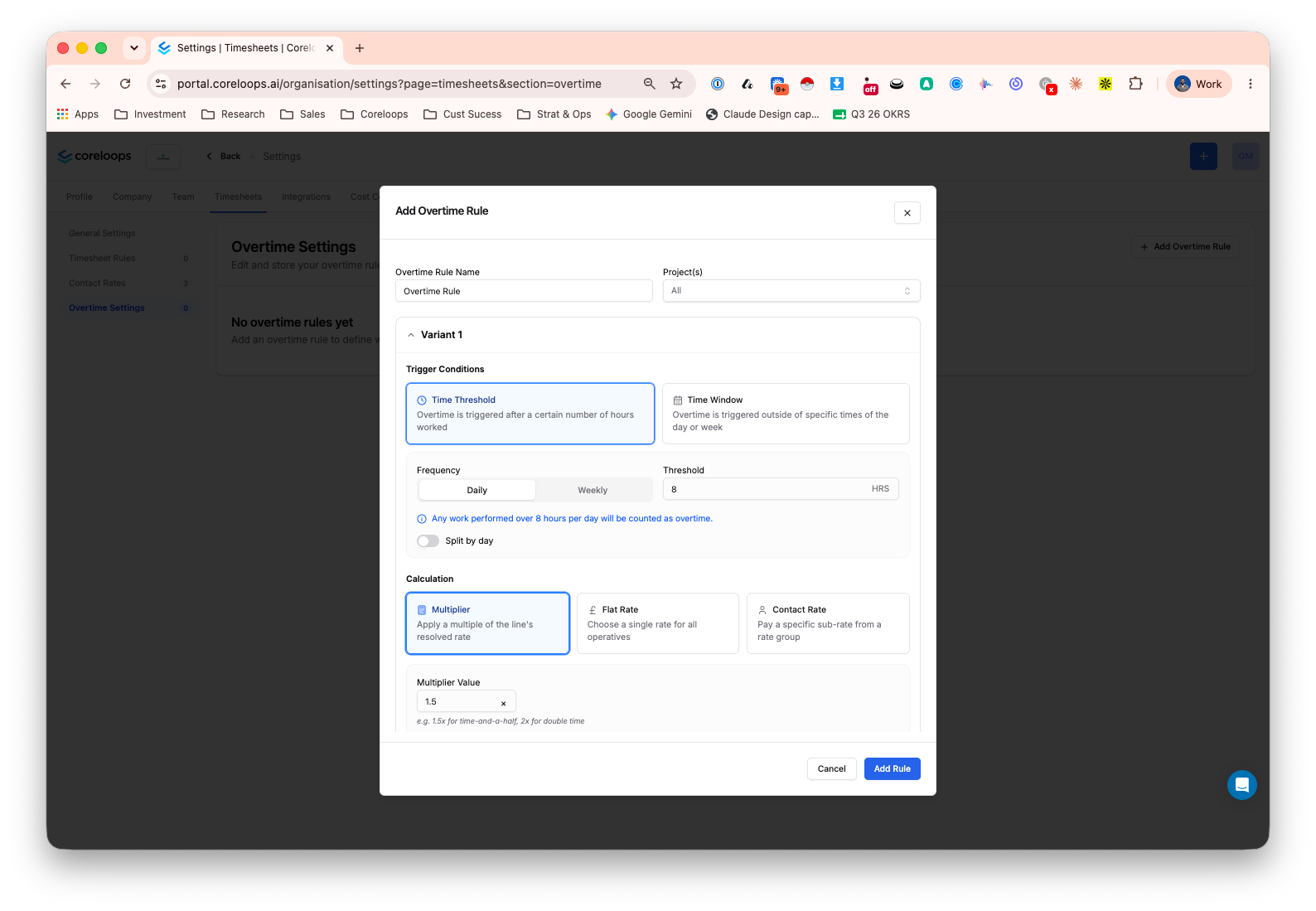
You can now set up overtime rules for timesheets instead of calculating them by hand. Decide when overtime kicks in, either after a set number of hours in a day or week, or outside specific hours or days, and choose how it's paid: a multiplier on the standard rate, a flat rate, or a worker's own agreed overtime rate. Rules can apply per project or be tailored to individual contacts, with contact-level rules taking priority. Overtime shows up as its own clearly labelled line on the timesheet, so it's easy to check before approving. You'll find it in Timesheets in the settings area.
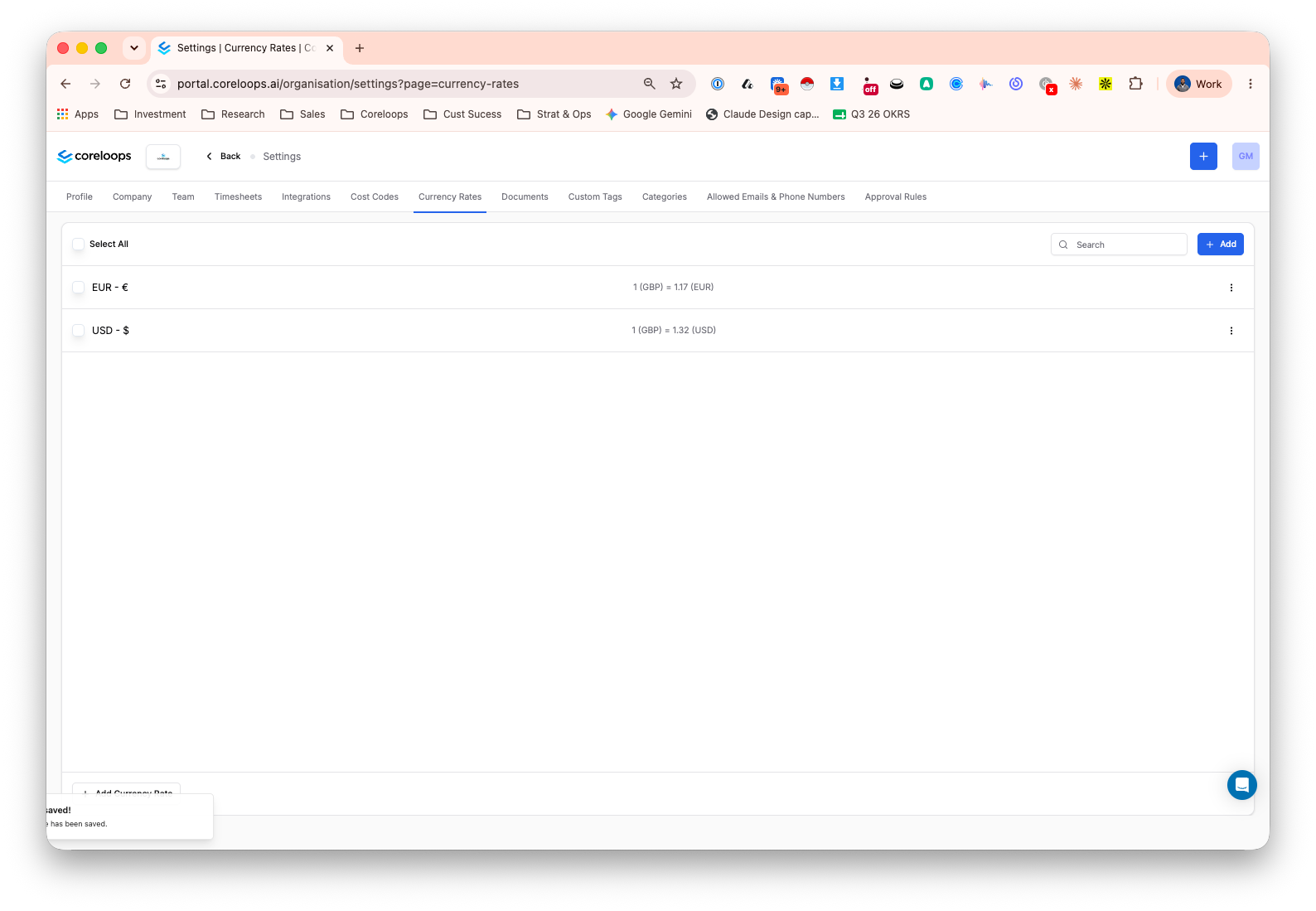
Multi-currency support (fixed rates)
If you work across more than one currency, you can now set a default currency for your account and fixed exchange rates in Workspace Settings, and Coreloops will show both the original and converted amount on your invoices, bills, payment applications, variations and BOQ line items. Every converted figure carries a clear "fixed rate estimate" label, and dashboards show a note explaining when the rates were last updated, so everyone knows exactly what they're looking at.
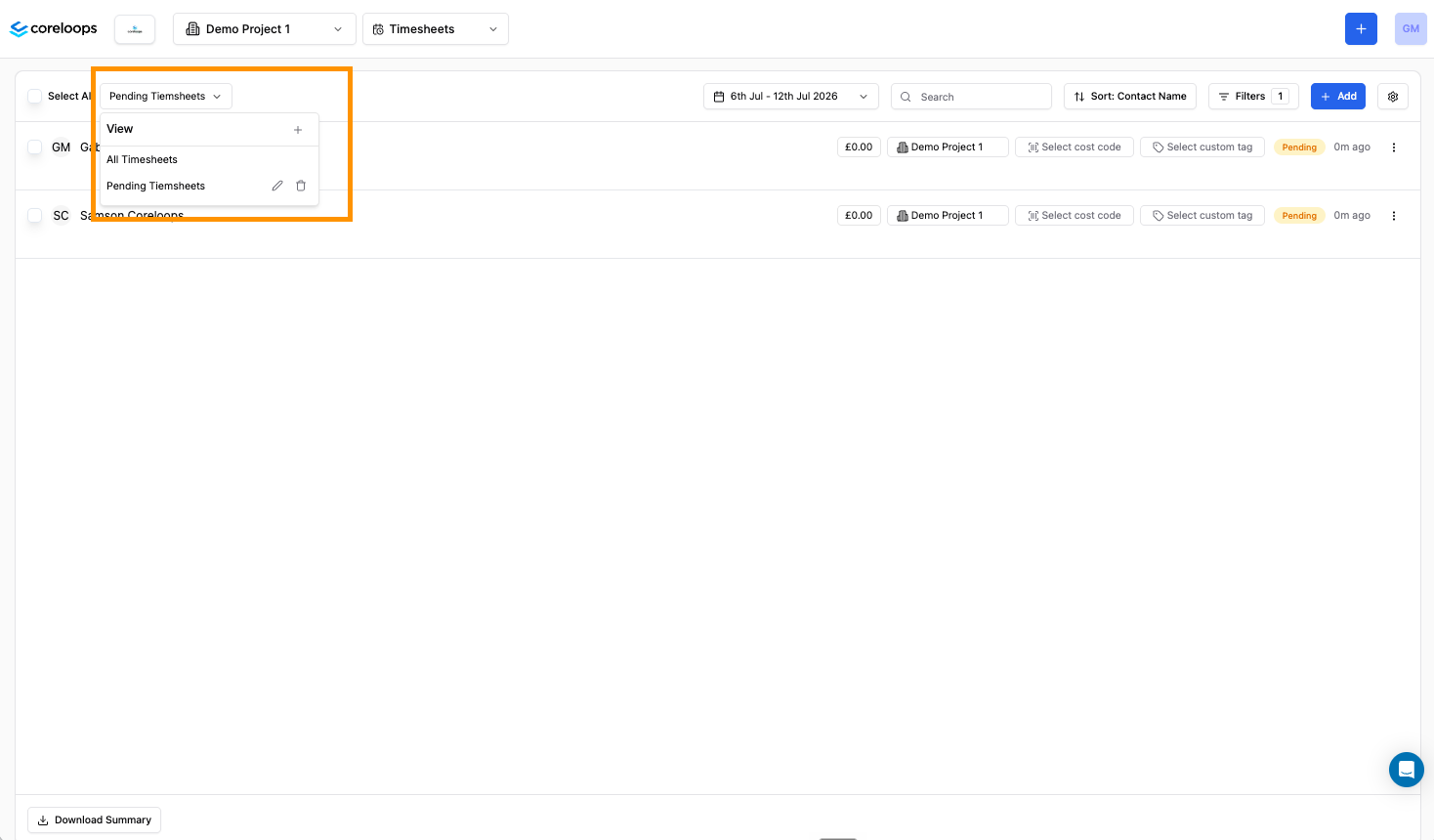
Saved views for timesheets
You can now save your favourite timesheet filters as a view, just like you already can with Reports. Set up your usual combination of worker, project, date range and status once, give it a name, and switch back to it any time from the dropdown above the timesheets table.
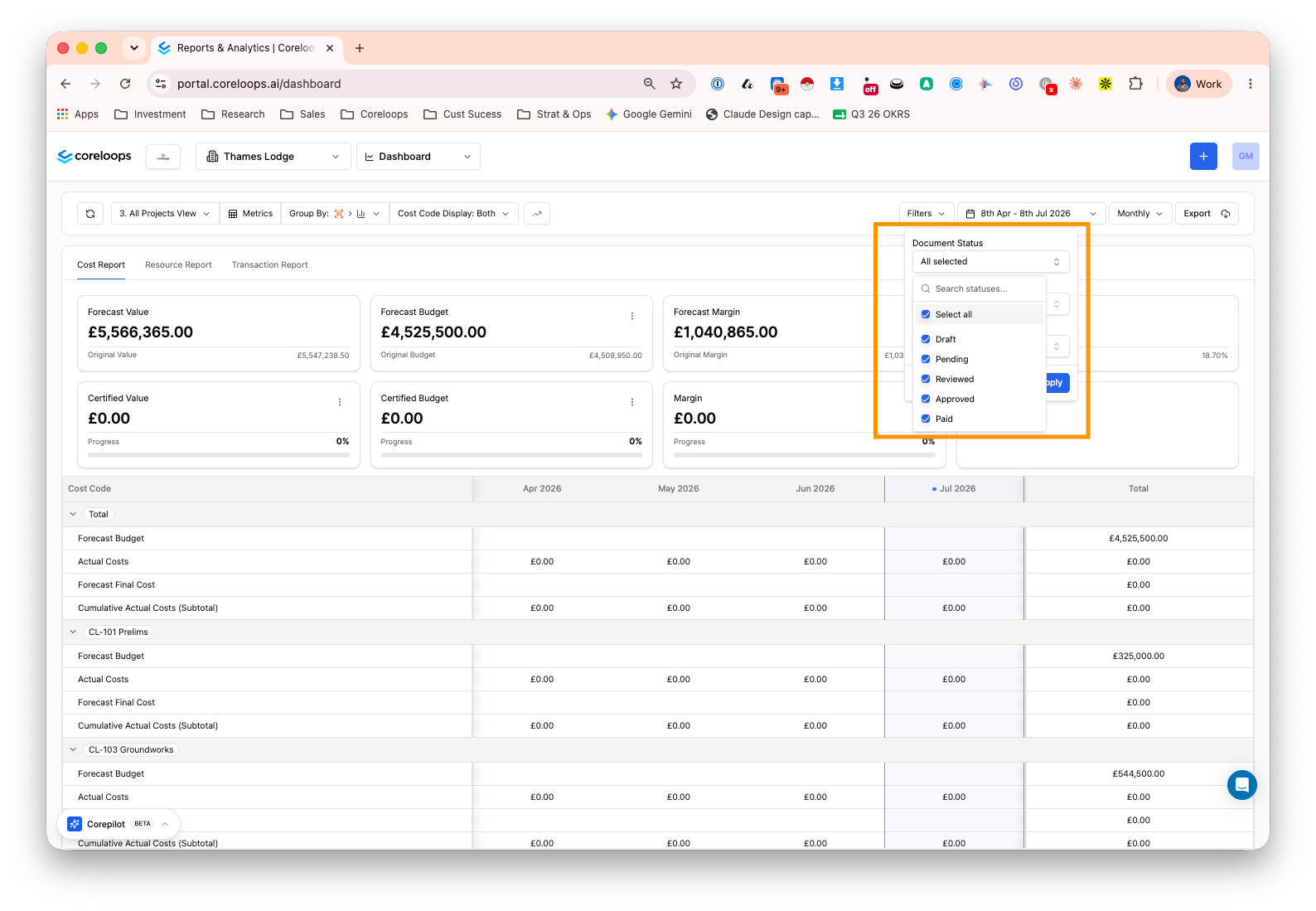
Choose which document statuses appear in a report view
Report views used to show approved documents only. You can now choose which statuses appear in a view, such as Draft, Pending, Reviewed or Approved, so you can build reports that include work still moving through approval, not just what's signed off. Set it once and it's saved with the view.
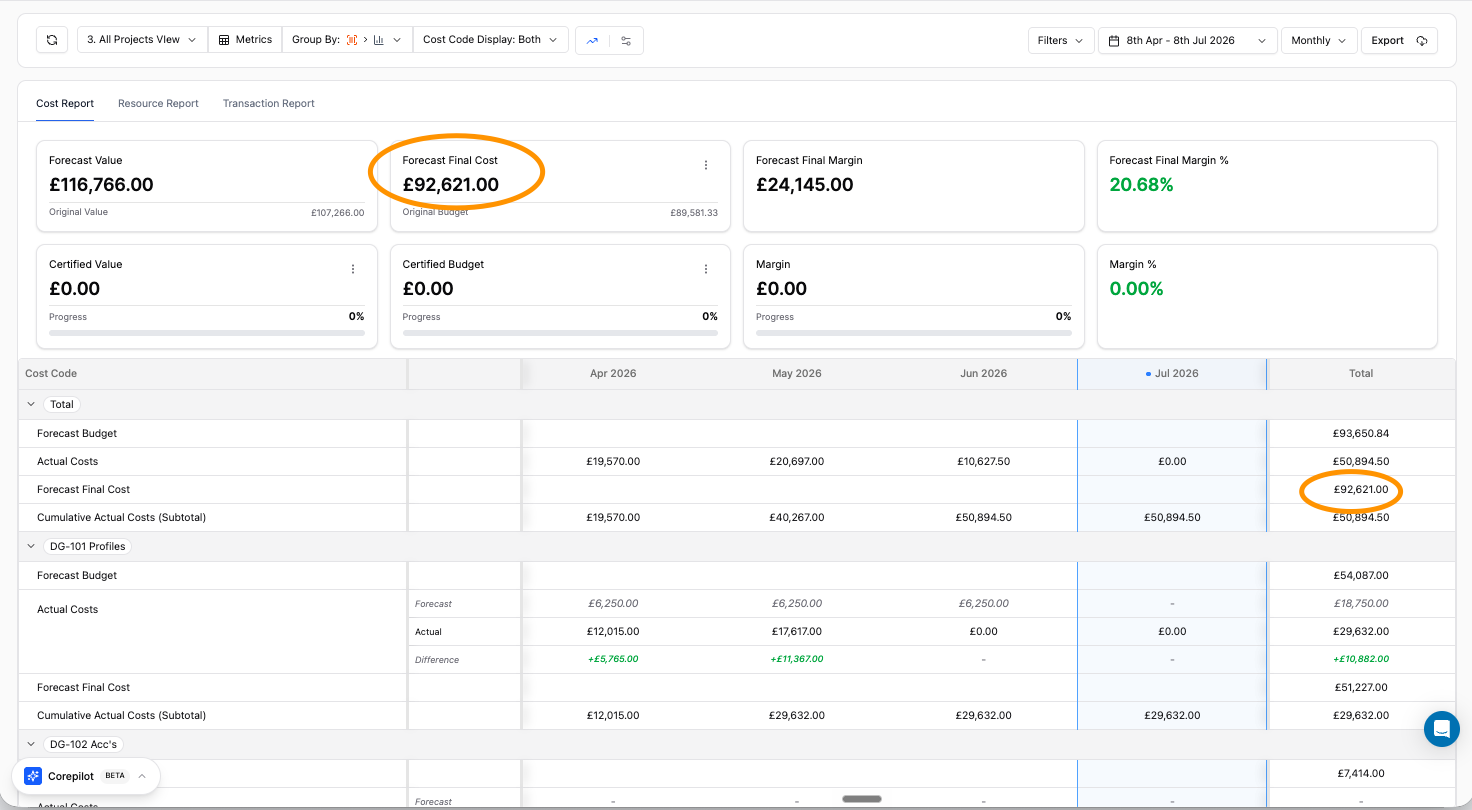
Forecast final cost by cost code
The cost report now lets you see forecast final cost broken down by cost code, not just as a project-wide total. It's calculated the same way as your other cost totals, so you can spot which cost codes are carrying the most exposure at a glance.
Purchase order delivery address auto-fill
Purchase orders now pre-fill the delivery address with the project's site address, so you don't have to retype it every time. You can still edit it per PO if a delivery needs to go somewhere else, useful if you're working across several sites at once.
Upload and read payment certificates
You can now upload payment certificates you've received from a client and ones you've issued to a subcontractor, and Coreloops will read the document and pull out the key figures: certificate number, dates, gross valuation, deductions and net sum due. Review and correct anything before saving, and find both certificate types together in one place, filterable by type.
Automatic rounding correction for line items
Coreloops now checks that a document's line items add up to its stated total, and if they're off by a rounding difference, it identifies the rounding pattern the supplier used and adjusts the figures so everything reconciles, without you having to step in. If it can't resolve a mismatch with confidence, the document is held for manual review, and the line items are highlighted for your review. It runs automatically as part of the processing, so fewer documents get stuck due to rounding errors before approval.
Flagging mismatched line item totals before Xero sync
When Coreloops AI processes an invoice, it now checks that the line items add up to the invoice total and flags it clearly if they don't, both on the document and on the affected lines. You can still go ahead and sync if you're happy with it, but you'll see the warning before anything gets sent to Xero rather than after a sync fails.
Manually override and flag tax amounts
If Coreloops can't automatically resolve a tax amount on a document, you can now type in the correct figure yourself, and it'll be used when the document syncs to Xero. Where the extracted tax amount doesn't match what's expected, the field is highlighted in yellow so it's easy to spot before you approve or sync.
Pick a directory contact for PO delivery phone numbers
When you're filling in delivery details on a purchase order, you can now pick a contact from your directory to auto-fill the delivery phone number, with contacts linked to that supplier shown first. One less field to type out by hand, and less risk of the wrong number ending up on site paperwork.
Bugs fixed/ Small Improvements
Sync button now shows a loading state while a document syncs, making it clearer that the document is syncing.
Several Xero Sync improvements
Sync now checks for a newer Xero status before syncing, avoiding failed syncs when a document was already actioned in Xero
Fixed small rounding discrepancies in tax amounts sent to Xero
Payment terms, VAT and CIS details now sync fully to Xero contacts
Fixed voided documents not displaying correctly in Coreloops
Timesheet improvements
Selecting a project for one day on a timesheet no longer applies that selection to every day
Adding a new project to a timesheet now correctly filters rates and carries over allowed cost codes
Submitted timesheets can no longer be edited by the operative after submission
Overtime hours are now correctly included in the timesheet total after a rate structure change
General updates
Fixed an oversized logo on mobile that broke the sidebar navigation
Document Updates
Bulk selection on document line items now clears automatically once an action completes
Changing a document's currency now saves properly and updates the line item display
BOQ Updates
Bulk tag assignment on BOQ line items now works as expected, and tags can be cleared at section level
June 9th, 2026

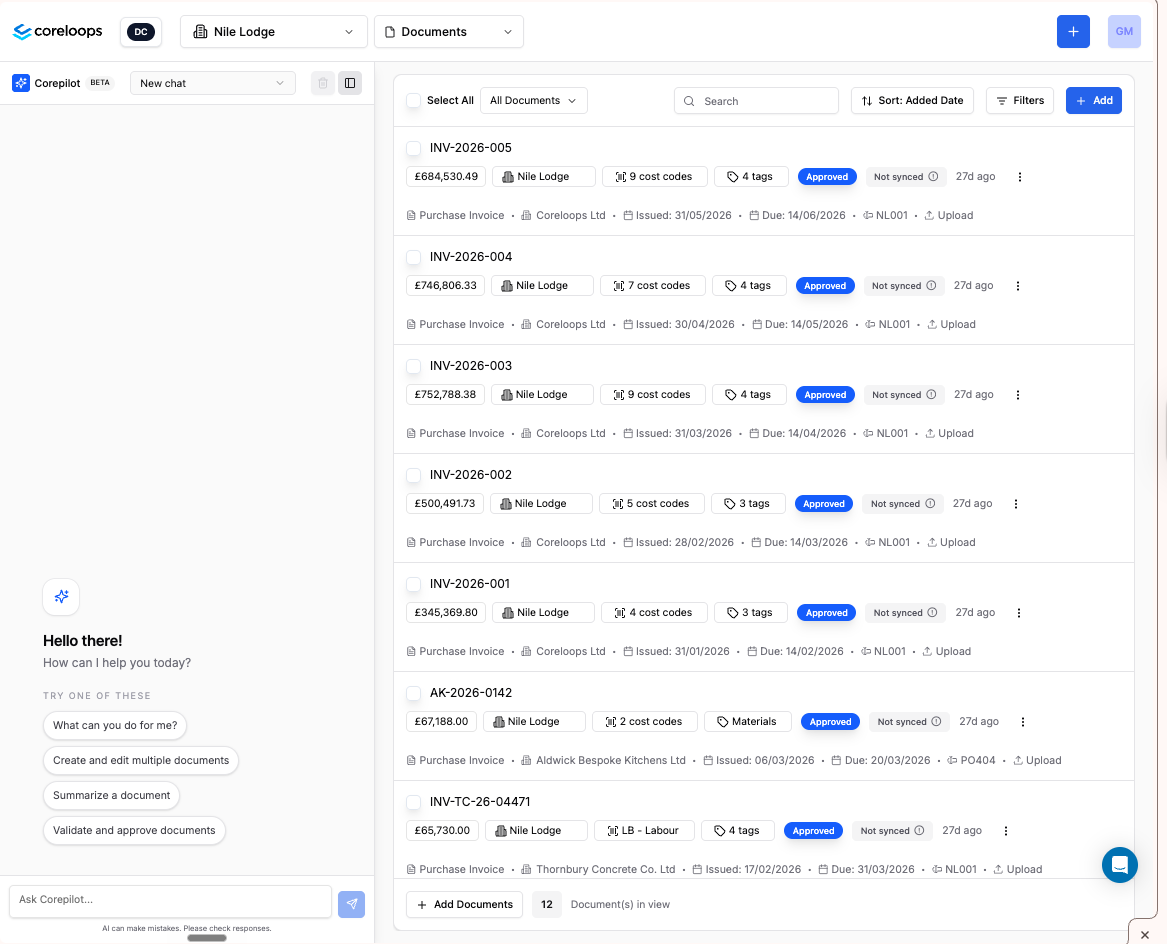
Corepilot for Documents
You can now ask Corepilot questions about your documents without leaving the platform. Ask things like "show all invoices from this supplier over £10k", "which documents are pending approval?", or "what's linked to variation VO-123?" and get answers grounded in your actual document data — including amounts, dates, statuses, and supplier relationships. Corepilot filters results to your project and permissions, and can surface links to the relevant documents in its responses.
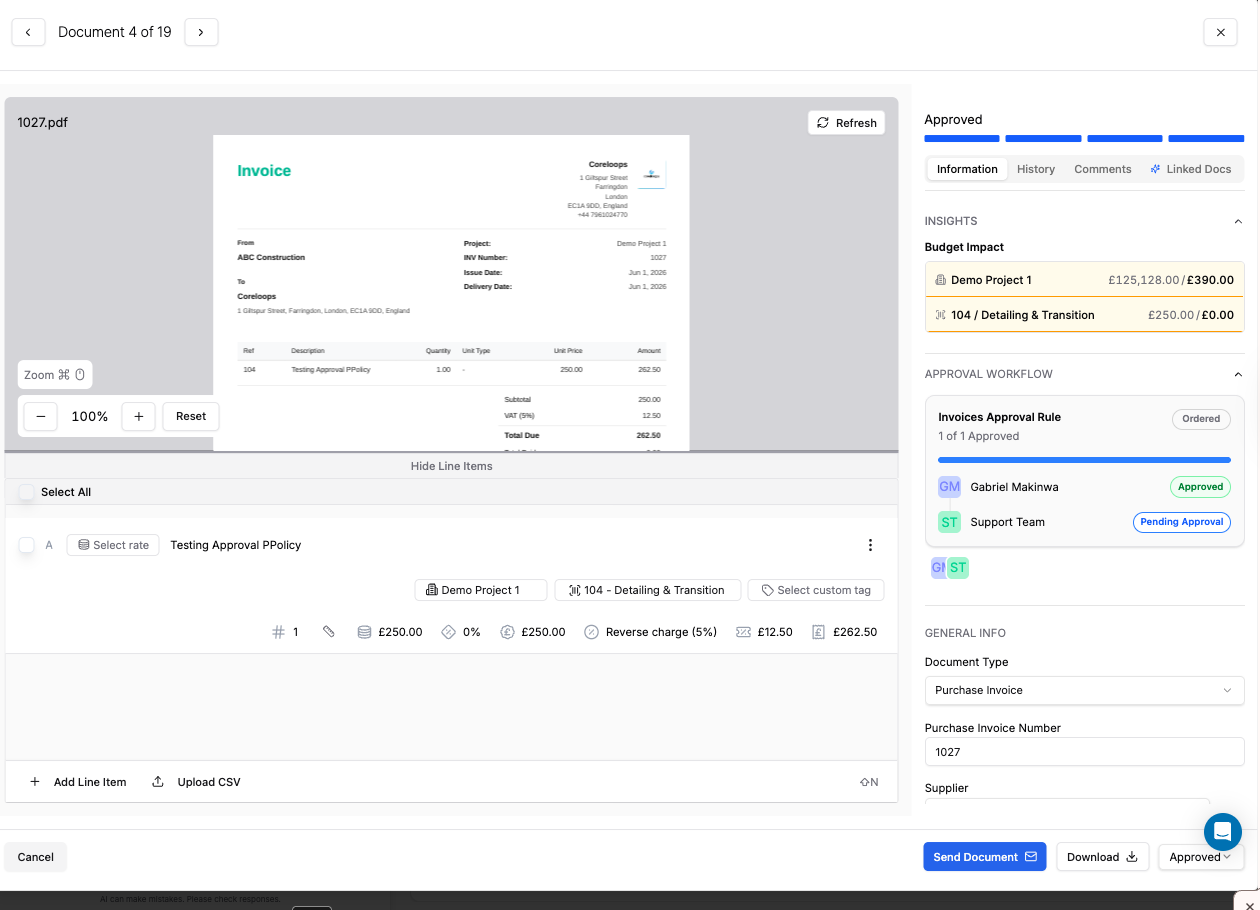
Approval Policies & Workflows
You can now define approval rules for your financial documents from within Settings. Rules let you specify when approval is required — for example, any supplier invoice above a set value — and who needs to approve it, whether that's a named individual, a team, or a multi-step chain of reviewers. Both ordered (sequential) and unordered (any approver can sign off at any time) approval structures are supported, and documents are blocked from progressing until the required approvals are in place. Approval status and approver details are visible directly on each document.
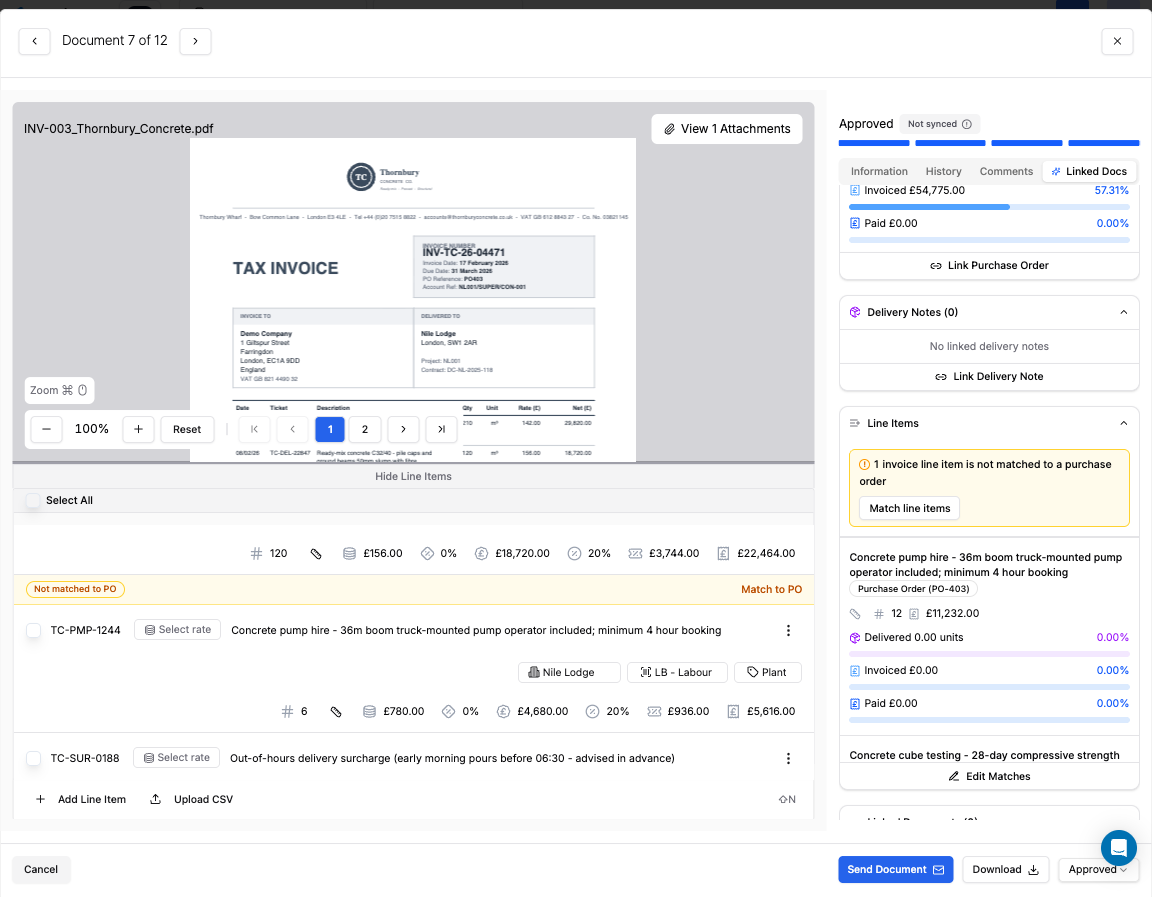
Flag Unmatched Invoice Line Items
When an invoice is matched to multiple purchase orders, any line items that couldn't be automatically linked are now flagged directly in the platform. You'll see a clear warning indicator on each unmatched item, along with a prompt to assign it to the correct PO manually. Attempting to approve an invoice while unmatched items remain will surface a warning — helping you keep financial records accurate before sign-off.
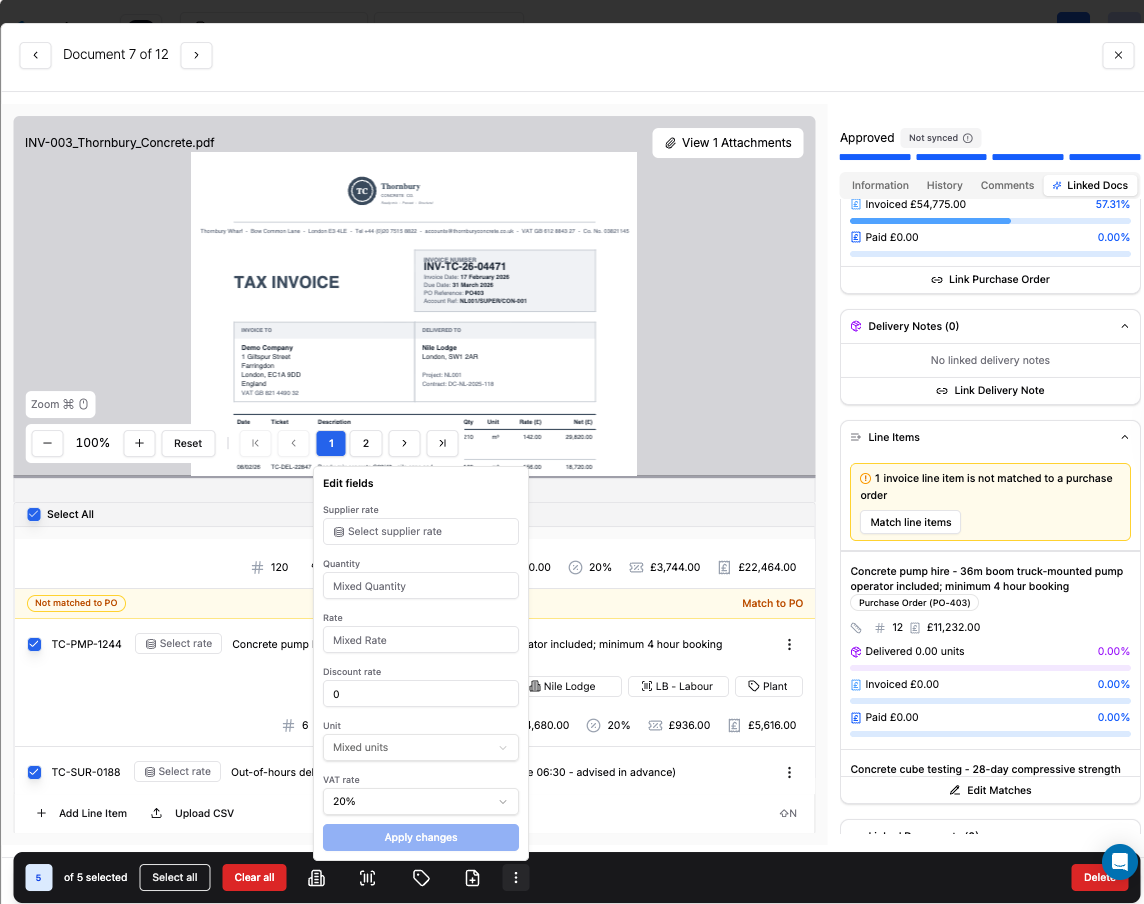
Bulk Apply VAT and Discount Rates Across Line Items
You can now update VAT rates, discount rates, and other key fields across multiple selected document line items in a single step. Select the items you want to update, open the new three-dot context menu in the toolbar, choose a field to edit, and apply the value to all selected rows at once. The same options are also available at the individual row level for single-item edits.
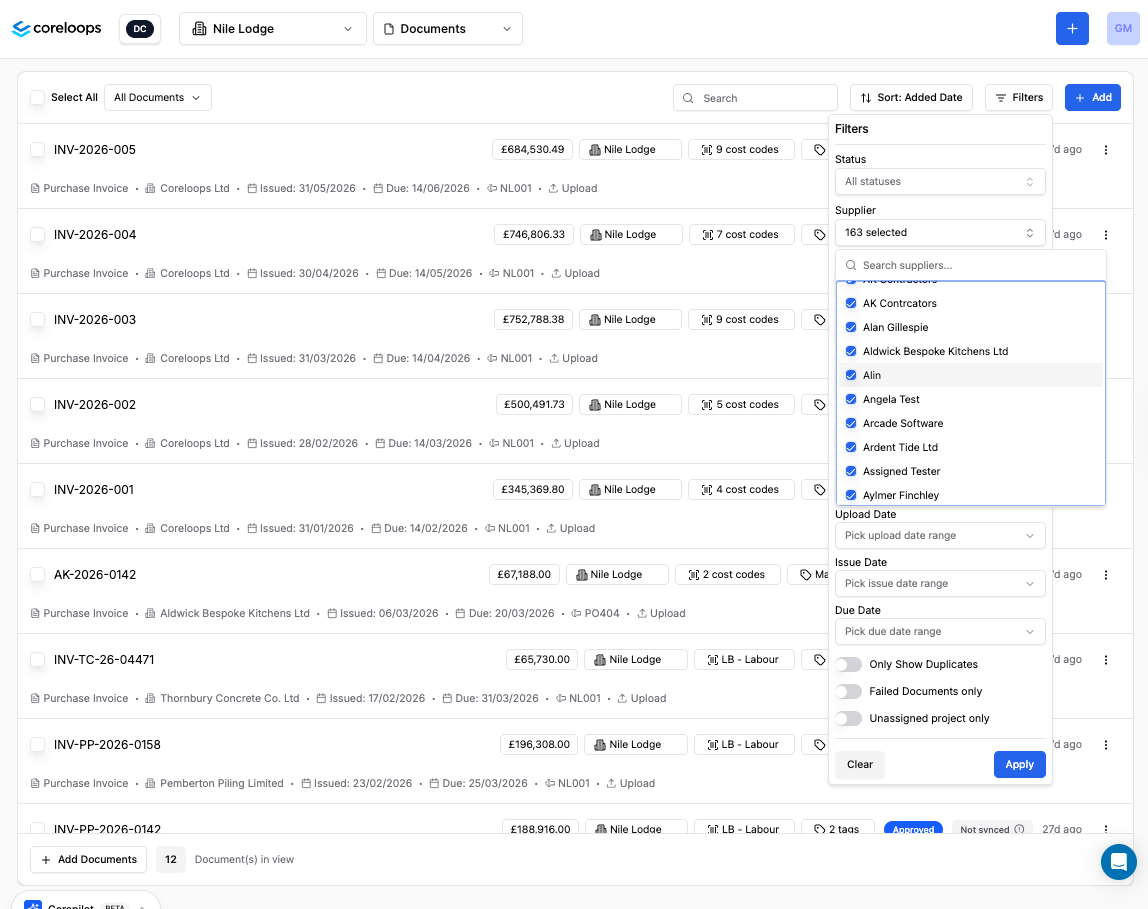
Multi-Select Document Filters
Document filters now support multiple selections at once, so you can view invoices, POs, or other documents across several statuses or categories without running separate searches. Each filter dropdown includes a search box to quickly locate the option you need, and the filter button shows a count of how many values are active. Clearing a filter resets all selections for that category.
AI Cost Code Classification for BOQ
You can now use Coreloops AI to automatically suggest or apply cost codes across your entire Bill of Quantities in one go. The AI draws on your project description, contract type, section names, and individual line item details to recommend the most appropriate code for each item — replacing the repetitive manual work of coding large BOQs. You can review suggestions before anything is saved, or apply them immediately and adjust afterwards. AI-assigned codes are tracked separately from manual entries in the audit log.
Upload and View Word Documents
You can now upload and view Word (.docx) files directly in the platform, alongside PDFs. Documents render inline with their formatting preserved — including headings, tables, lists, and bold or italic text — so there's no need to convert files before uploading. Protected or corrupted files will show a clear error message.
May 11th, 2026

Upload Documents via WhatsApp
You can now send invoices, delivery notes, or any document directly to Coreloops via WhatsApp. Rather than downloading files and uploading them manually, simply forward the document from your phone — Coreloops extracts it automatically and drops it into your document inbox. Useful on site when you're away from a desk.
AI Timesheet PDF Upload
You can now upload timesheet documents as PDFs or images, and Coreloops will automatically extract and map the data into your timesheets using AI. This replaces manual re-entry for sites working from paper or PDF-based records, and supports a custom parsing prompt at company level so the AI can read your specific timesheet format accurately.
Supplier Tax Defaults Auto-Applied
When a document arrives and is matched to a supplier, Coreloops now automatically applies that supplier's default VAT rate and CIS settings — no more manually setting tax rates on every document. Default VAT rates are also visible and editable per contact in the directory and can be updated in bulk across multiple contacts at once.
Gross Status CIS Support
Coreloops now correctly handles subcontractors who hold gross payment status — a 0% CIS deduction rate. These subcontractors still require HMRC reporting, and the platform now includes them in your monthly CIS returns with the correct gross payment indicator. Where the deduction rate is 0%, you can manually enter the labour and materials split rather than relying on an automated calculation.
Xero Contact Data Sync
Payment terms, VAT rates, and CIS details set on your contacts now sync bidirectionally between Coreloops and Xero. Any changes made in either system are reflected in the other, so you no longer need to maintain the same information in two places.
Exclude Projects from Sync
You can now stop specific projects or suppliers from syncing to your accounting software. This is useful for internal jobs, test projects, or suppliers that need to be handled manually — exclusions can be set independently at both project level and supplier level from within your settings.
CorePilot Document Feedback
After processing a document, CorePilot now gives you a plain-English summary of what it found — the document type, how confident it is, and what happens next. If a document couldn't be confidently classified, CorePilot will tell you and point you to the Document Inbox for review, rather than leaving you guessing about why it wasn't processed.
CorePilot Learns Your Cost Code Classifications
When you correct the cost code suggested by Coreloops AI during document approval, that correction is now saved and used to improve future suggestions for similar invoices from the same supplier. Over time this means less manual editing as the AI adapts to how your team categorises costs.
Improved Transaction Report Export
The cost report Excel export now visually distinguishes cost code totals from individual line entries, with totals displayed in bold and each child line showing its associated cost code. This makes it much easier for your accounts team to filter and group spend by cost code without manual reformatting. Cost code totals highlighted and each line item labelled with its code — making it straightforward to run pivot tables or share with your accounts team.
Payment Application Metrics
The payment application summary now includes Certified Amount, Applied Amount, Previous Certificate Amount, and a Difference column showing certified versus applied — giving you a clearer picture of valuation progress at a glance without opening individual line items.
Multi-Select BOQ Filters
You can now select multiple options within each filter in the Bill of Quantities, making it easier to view and compare line items across different sections or categories at the same time.
CSV Line Item Upload
Documents with large numbers of line items can now be populated by uploading a CSV file. A downloadable template is available from the upload modal, and the system flags any invalid rows before importing so you can correct them first.
Select All Filtered Results
Clicking 'select all' in Documents or Timesheets now selects every record matching your active filter — not just the items on the current page. The selection count reflects your full result set, and invoice summary totals calculate correctly across all pages.
Toggle Budget Insights
Admins can now turn off budget insights at company level for teams that don't use them. This keeps the interface focused on what each team needs and can be managed from admin settings.
March 23rd, 2026

Duplicate document detection
Coreloops now flags documents that look like duplicates before they're processed. If a delivery note, invoice, or PO has already been uploaded, you'll see an alert — preventing double-entry and inflated costs before they happen.
Budget warnings at the point of approval
When approving a document that would push a cost code, PO, or project over budget, Coreloops now surfaces a detailed warning showing exactly how much the overage would be — and lets you decide whether to proceed or cancel. Over-budget indicators also appear in document lists and summary cards so nothing sneaks through.
Per-supplier accounting sync control
You can now disable automatic invoice syncing to your accounting system on a per-supplier basis. Useful for internal suppliers, petty cash, or any supplier whose documents shouldn't flow through to Xero or QuickBooks.
Budget utilisation always current
Budget utilisation figures now always pull the latest data, so cost codes, POs, and projects reflect recent approvals immediately — no stale numbers after an update.
Budget tooltips no longer block navigation
The budget hover tooltips in the documents table now close automatically when you click away or open a dropdown, so they no longer obscure other parts of the screen.
March 16th, 2026

What's New: Week of 9 Mar 2026
Unassigned document alerts
Never miss an uploaded document that hasn't been assigned to a project. A new notification badge now appears in the project selector whenever documents are sitting unassigned, so nothing slips through.
Match one invoice to multiple purchase orders
When an invoice covers more than one PO — common on large sites with consolidated supplier deliveries — you can now link it across all relevant purchase orders in a single step. No duplication, no workarounds.
Custom tag group prompts
Added support for custom prompt fields on tag groups, giving teams more flexibility to structure cost tagging in a way that fits their project setup.
In-app support
Coreloops now has a built-in support messenger. If you need help, you can reach the team directly from inside the platform without switching tabs.
Over-budget POs flagged in red
Purchase orders that exceed their budget are now highlighted in red with a clear alert, so overspend is visible the moment it happens — not at month-end.
Failed documents now visible
Documents that couldn't be processed are no longer silently hidden. They now appear in your document list so you can identify, investigate, and reprocess them.
March 2nd, 2026
This week we’ve focused on making it easier to explore your project data with Corepilot and quickly review key financial information across your documents.
Corepilot now remembers your conversations
Your Corepilot chats are now saved within each report view.
This means you can:
return to previous questions
revisit insights you’ve already explored
continue analysing project data without starting from scratch
It makes ongoing cost analysis much easier when reviewing reports over time.
Corepilot can now reference more project context
Corepilot can now draw on a broader set of information when analysing your reports.
This helps it:
connect information across different reports
understand project context more clearly
provide deeper insights when answering questions about your costs and performance
Instantly check budget and PO utilisation
You can now hover over documents in the document list to quickly see:
Approved value
Pending value
Remaining budget
This makes it easy to check spending progress without opening every document.
Quickly resolve payment application sync issues
If payment applications ever fall out of sync, you can now resolve this instantly.
New options allow you to:
Refresh All – rebuild the entire application chain
Refresh Previous – update earlier linked records
Coreloops will also show a warning banner if an application appears out of sync, so you can address it quickly.
More flexible Excel imports for forecasts
Importing forecast data from Excel is now more forgiving.
Minor formatting differences in column names will no longer cause issues during import, making it quicker to bring forecast data into Coreloops.
Faster navigation between projects
Coreloops now remembers the last project you were working on.
When switching between screens, you’ll automatically return to that project, saving time navigating back to your work.
Fix: comments on unassigned documents
We resolved an issue that prevented comments from being added to documents that weren’t linked to a project.
February 23rd, 2026

This week’s updates focus on helping teams manage forecasts and payment applications faster, improving document organisation, and strengthening integrations with your accounting system.
Bulk forecast entry for faster planning
You can now enter forecast values across multiple cost codes and periods in one action.
This makes it much quicker to update forecasts when reviewing project budgets or planning future spend.
You can also:
export a forecast template to Excel
update values offline
re-import them directly into Coreloops
Apply and certify multiple valuation items at once
Managing payment applications is now faster with new bulk actions.
You can now apply or certify values across multiple BOQ items and sections in a single step.
This helps reduce repetitive updates when preparing valuations and keeps payment applications moving quickly.
Draft suppliers created automatically
When Coreloops encounters a new supplier during an import or AI document processing, it will now create a draft supplier profile automatically.
You can then review and confirm the details later, avoiding interruptions during document processing.
Better sorting on the documents page
You can now sort documents by:
Date
Supplier
Document number
Total value
And more
This makes it easier to quickly find the documents you need, especially on larger projects with high document volumes.
Xero and QuickBooks payment syncing
Payments recorded in Xero or QuickBooks will now automatically appear in Coreloops.
This keeps your project data aligned with your accounting system and gives you a clearer view of what has been paid.
Attachments now sync with your accounting system
PDFs and file attachments linked to documents can now sync with Xero and QuickBooks.
If attachments are missing locally, Coreloops will automatically retrieve them from the accounting system.
Improved navigation with the back button
The back button now behaves more naturally inside the platform.
When you return to a previous page, Coreloops will now take you back to the correct in-app location rather than redirecting to an external page.
Fix: smoother Corepilot responses
We resolved an issue that could occasionally interrupt Corepilot responses so conversations now stream smoothly.
Fix: improved cost code matching during document processing
We fixed an issue where documents containing multiple cost codes could occasionally assign them incorrectly during processing.
February 16th, 2026

This week marks the launch of Corepilot, your AI assistant for exploring project cost data.
Introducing Corepilot
Corepilot is a new AI assistant built directly into your cost reports.
You can now ask questions about your project data and receive instant insights without manually digging through reports.
For example, you can ask:
How are we performing against budget this month?
Which cost codes are trending over budget?
What has been certified vs applied this period?
Corepilot helps teams quickly understand project performance and identify potential issues earlier.
Built-in safeguards for your data
Corepilot is designed to safely analyse your data without making any changes to your projects.
It operates in a read-only environment, meaning it can explore your information but cannot modify documents or financial records.
Clearer warnings when bulk valuations exceed budgets
When updating payment applications in bulk, Coreloops will now warn you if:
the value exceeds the budget
the value goes over 100% of the contract amount
This helps prevent accidental over-claims during valuation updates.
February 9th, 2026

This week’s update introduces a faster way to create new documents and improves several everyday workflows.
Create new documents from existing line items
You can now select line items from an existing document or BOQ and generate a new document in a single step.
For example, you can quickly create an invoice or document using the relevant items without re-entering information.
This saves time and reduces manual data entry.
Clearer copy actions in the BOQ
Copy actions in the BOQ are now labelled more clearly.
Buttons will now display context-specific labels such as:
Copy Section
Copy Line Item
This helps avoid confusion when duplicating items within large BOQs.
Exported files now include the project name
All exported files now include the project name in the file title.
This makes it easier to organise downloaded reports when working across multiple projects.
Faster project setup with searchable client selection
The client field when creating a project is now searchable.
This helps teams quickly locate the correct client when setting up new projects.
Fix: smoother cost code updates on documents
We resolved an issue where updating cost codes on document line items could briefly cause the document table to refresh unexpectedly.